Video Collage Maker:Mix Videos
- 4.6
- Rating
- 5.00M
- Installs
- Free
- Price

 Analysis by App-foxy
I tried Video Collage Maker:Mix Videos as a practical editing tool rather than a one-off novelty, and my first impression was that it understands a very common mobile editing need: combining short clips, photos, and music without opening a full desktop-style editor. It is a free app from Momentic Apps in the video players and editors category, aimed at people who want a finished visual story quickly. The store summary describes video collages, editing, and slideshows, and that matches the way I found myself using it: selecting several pieces of media, arranging them into a compact composition, and giving the result a more deliberate rhythm.
That focus matters because mobile video editing can become unnecessarily complicated. Many alternatives put a timeline, layers, transitions, filters, captions, and audio controls on the screen at once. Video Collage Maker:Mix Videos takes a more approachable route for smaller projects. I would recommend it to someone making a birthday montage, a travel recap, a family slideshow, or a social post from a handful of clips. I would not choose it first for a long-form project that needs detailed sound mixing, frame-by-frame control, or a highly polished professional finish.
How the interface supports readable, manageable editing
The app’s strongest inclusive quality is its relatively clear purpose. Instead of asking me to learn a complicated production workflow, it centers the task around media selection and composition. That makes the first session less intimidating, especially for people who are comfortable taking photos and videos but do not think of themselves as editors. The basic idea is easy to explain: choose content, shape it into a collage or slideshow, add music when appropriate, and review the result.
You May Also Like

 Blood Strike: 2.5 Anniversary
Blood Strike’s Loadouts Turn Every Drop Into a Tactical Gamble
A close look at Blood Strike’s custom loadouts: how fast access to signature weapons reshapes its battle royale rhythm, rewards preparation, and narrows the gap between fights.

 Pandora - Music & Podcasts
Pandora’s Music Is Easy to Start, but Harder to Recover
Pandora’s strength is its low-effort path from a seed to a station. Its weak spot is how much confidence it asks you to place in connection, setup, and quiet recovery.

 8 Ball Pool
 Is Built on Rivalries, Rematches, and Routine
A close look at the rivalries, rematches, shared routines, and unanswered safety questions that turn a quick pool match into a persistent mobile community.

 Samsung Music
’s Quiet Strength Is Playing What You Already Own
Its reach comes less from spectacle than from dependable access to a personal library. That simplicity is both the app’s strongest retention engine and its ceiling.

 AccuWeather: Weather Radar
AccuWeather Review: A Quick, Clear Forecast for Everyday Decisions
For everyday plans, the best forecast is the one you can understand quickly. AccuWeather makes rain timing, radar, and local conditions easy to act on, with a few trade-offs.

 Hill Climb Racing
Why Hill Climb Racing Still Turns Crashes Into One More Run
A tiny car, a bumpy hill and one more upgrade: Hill Climb Racing keeps resurfacing because its simple chaos makes every near-miss feel personal.
More From Our News Desk



That simplicity also helps when I am editing on a small phone screen. A dense professional editor can make every control feel equally important, while this kind of collage-focused workflow gives the main action more prominence. I found it easier to keep track of the project when working with a small group of images and short clips rather than trying to manage a large media library at once.
There is a useful distinction between simple navigation and simple results. The app makes it relatively easy to start, but the quality of the finished video still depends on the material I select. If I mix portrait photos, wide landscape clips, and videos with very different lighting, the composition can feel uneven. The app reduces the technical burden, but it cannot completely replace decisions about order, cropping, timing, and musical mood.
For better readability, I would prepare the material before opening the editor. I create a separate album containing only the photos and clips I want, remove near-duplicates, and decide on a rough beginning and ending. This is more than a convenience tip: it reduces the amount of scrolling and repeated visual comparison, which can be tiring for anyone who finds crowded galleries difficult to process. It also makes the app feel faster because I spend less time searching for the right file.
I also recommend previewing after each meaningful change instead of making many adjustments in one pass. In a collage workflow, a small change to the order or duration can affect the whole mood. Short review cycles make mistakes easier to spot and reduce the need to remember several changes at once. That approach is especially helpful for users who prefer predictable, step-by-step tasks over a large editing session.
What the design means for different ways of processing information
Video Collage Maker:Mix Videos suits people who think visually. Seeing the selected media together can make it easier to judge whether a sequence feels balanced than reading a list of filenames. On the other hand, users who rely heavily on descriptive labels may need to organize their own gallery carefully before editing, because choosing the correct clip from many similar thumbnails can still be a challenge.
I would also keep the first project short. A compact slideshow gives me a chance to learn how the app handles the relationship between photos, videos, and music without becoming overwhelmed. Once that workflow feels comfortable, I can build a longer project with more confidence. This is a better introduction than immediately attempting a large family archive or a complete event recap.
Motor and sensory considerations during real editing
Touch editing always brings practical questions. Selecting small thumbnails, dragging items, adjusting a crop, and tapping controls repeatedly can be uncomfortable for users with limited precision, hand tremors, joint pain, or fatigue. A collage maker can be easier than a multi-track editor because there are fewer simultaneous controls, but it does not remove the need for accurate taps and gestures.
My workaround is to make selections in batches and pause between stages. Rather than repeatedly opening and closing the media picker, I gather the intended photos and clips first. I also avoid trying to perfect every crop while holding the phone in one hand. Supporting the device on a table makes the editing process steadier and reduces accidental touches, particularly when I am working with a longer sequence.
Users who are sensitive to visual clutter may appreciate the narrower purpose of the app, but collages themselves can become busy. Combining several moving videos with decorative choices and music may create a lot of simultaneous stimulation. I get better results when I treat the collage as a visual hierarchy: one or two moments should lead, while the remaining material supports them. Fewer, stronger elements usually look better than filling every available space.
Audio deserves separate attention. Adding music can make a slideshow feel complete, but it can also be distracting or unsuitable in situations where sound is not wanted. I would review the project with the device volume low or muted before sharing it, then decide whether the music improves the message. For a family member who watches videos without sound, the visual order should still make sense on its own.
This is one of the app’s important trade-offs. It is inviting for quick visual storytelling, but a person who needs detailed control over audio levels, spoken narration, captions, or precise timing may find the experience limited compared with a full editor. The app is better at helping me assemble a pleasing visual package than at supporting a complex accessibility-oriented production workflow.
A useful workflow for hands-busy or time-limited situations
I found the app most useful when the editing goal was defined before I started. For example, after a day out, I might choose a few establishing photos, several short action clips, and one closing image. That order gives the project a natural shape and means I am not making every decision while distracted. If I am editing during a commute or between appointments, I save the creative selection for a calmer moment and use the app mainly for assembly.
For people who cannot comfortably hold a phone for long, this preparation is valuable. The actual editing session becomes shorter, and there is less repeated swiping. I would also avoid creating a collage while moving, in poor lighting, or in a noisy environment. Those conditions make small controls harder to use and make it more difficult to judge whether the final pacing feels right.
Situational access: where the app fits especially well
The clearest everyday use case is a quick family or social montage. Imagine returning from a weekend gathering with a mixture of portrait photos and short videos. I can place the clearest group image near the beginning, use a few candid moments in the middle, and finish with a photo that gives the sequence closure. A music track can provide continuity, but the project still works if someone watches it silently.
It is also useful for small businesses and casual creators who need a visual update without building a full campaign. A café could assemble a short sequence of new dishes, a hobby seller could combine product photos with a demonstration clip, and a club could make a recap of an event. In these cases, the value is not advanced editing power; it is the ability to turn scattered phone media into something shareable with less effort.
Another good scenario is a personal slideshow for someone who prefers photos to continuous video. A collection of still images can feel more intentional when arranged with music and motion, while short video fragments add life without requiring a complete recording. I like this approach for travel memories because it lets me include both carefully composed photos and spontaneous moments in one compact result.
The app can also be helpful for users who are new to editing. Its free starting price lowers the risk of experimenting, although optional in-app purchases range from ninety-nine cents to one hundred ninety-nine dollars and ninety-nine cents per item. I would pay attention to any purchase prompt and decide in advance whether the basic workflow is enough for my needs. The option to begin without an upfront charge is convenient, but “free” does not mean every possible editing choice is necessarily included.
For a user deciding whether the app will run on an older phone, the minimum operating system is Android 8.0. The current version is 16.6.4, so I would check the device’s software before planning a project. That small check can prevent an unpleasant surprise, especially if the phone is used by a child, an older relative, or someone who depends on a particular device and cannot upgrade easily.
How it compares with familiar alternatives
Compared with a traditional slideshow tool, Video Collage Maker:Mix Videos is more flexible because it brings video clips into the same visual project as photos. Compared with a full mobile video editor, it is less demanding and better suited to a quick collage, but it gives up some depth. I would choose a timeline-based editor for layered sound, long sequences, detailed captions, or exact cuts. I would choose this app when the main challenge is arranging mixed media into a compact visual story.
That difference is important for inclusive use. A simpler app can reduce cognitive load, but a more advanced app may offer the specific controls needed by someone who communicates through captions, narration, carefully timed visual prompts, or detailed audio adjustments. There is no universally accessible editing interface; the right choice depends on whether the user values a shorter learning curve or finer control.
The app’s popularity suggests that this focused approach resonates with many people. It has a 4.6 average from around 85 thousand ratings, along with over 5 million installs and about 1.4 thousand written reviews. Those figures do not tell me whether it will suit a particular motor, sensory, or communication need, but they do indicate that it is not an obscure experiment with no established audience.
Remaining barriers before you commit to it
The biggest limitation is that ease of starting does not guarantee ease of finishing. A polished result still requires choosing compatible media, checking the crop, reviewing the order, and watching the complete export. Users who want a one-tap result may be disappointed when the first arrangement looks awkward. I would reserve a few minutes for review rather than assuming the first version is ready to share.
Mixed orientations can create another source of friction. Portrait photos and landscape videos do not naturally occupy the same space, and cropping one to fit may remove an important face or detail. I recommend checking every frame containing people, signs, or products. Automatic composition is convenient, but it should not be trusted blindly when the edges carry meaning.
There is also a possible mismatch between the app’s friendly premise and demanding projects. If I need a narrated instructional video, a caption-led announcement, or a carefully timed presentation, I would move to an editor designed around those requirements. The collage approach can support visual variety, but it is not the best foundation for content where precise accessibility information must remain synchronized with the image.
People with limited vision may need to test whether the app’s controls and media picker work comfortably with their preferred device settings and assistive tools. I would not assume that a visually simple interface is automatically suitable for every screen-reader or magnification workflow. The most responsible approach is to begin with a tiny project and check whether selecting media, adjusting the composition, and reviewing the result are manageable before investing time in a larger one.
Similarly, users with hearing loss can still create useful visual slideshows, but music should not carry the whole message. I would make sure the sequence communicates through images alone or add explanatory text in a separate tool if the project depends on spoken information. That is a content-planning issue as much as an app issue, and it is worth considering before sharing a video with a mixed audience.
Families should also think about the age rating. The app is rated Everyone, which makes its general audience broad, but that does not replace ordinary supervision around media sharing, purchases, or the personal content placed into a project. A child may find the collage workflow approachable, while an adult should still help review what is selected and where the finished video is shared.
My inclusive verdict after using the workflow
Video Collage Maker:Mix Videos is at its best when accessibility means reducing unnecessary complexity. I can imagine recommending it to a friend who wants to combine phone memories without learning a professional editor. The focused collage and slideshow workflow makes a small project feel achievable, and the ability to mix photos, videos, and music gives it more range than a basic photo-only slideshow.
I would especially suggest it for short personal montages, casual social content, and first editing projects. Preparing the media in advance, keeping the first sequence short, supporting the phone on a stable surface, and checking the result with sound muted are simple changes that make the experience more manageable across different abilities and environments.
I would steer a friend elsewhere if they need exact audio control, extensive captions, long-form timeline editing, or a workflow built around assistive requirements that must be tested in detail. A simpler interface can be welcoming, but it can also leave out the controls that make a complex project truly usable.
Overall, Momentic Apps has made a practical free video editor for people who want a visual result without a steep technical entry point. Its Everyone age rating, Android 8.0 compatibility, and broad adoption make it easy to consider, while the optional purchases mean I would still review the available choices carefully. My recommendation is positive but specific: use it for concise, image-led storytelling, keep expectations realistic, and judge the finished project by how clearly it communicates to the person watching it.
FAQs for Video Collage Maker:Mix Videos
01What is Video Collage Maker: Mix Videos used for?
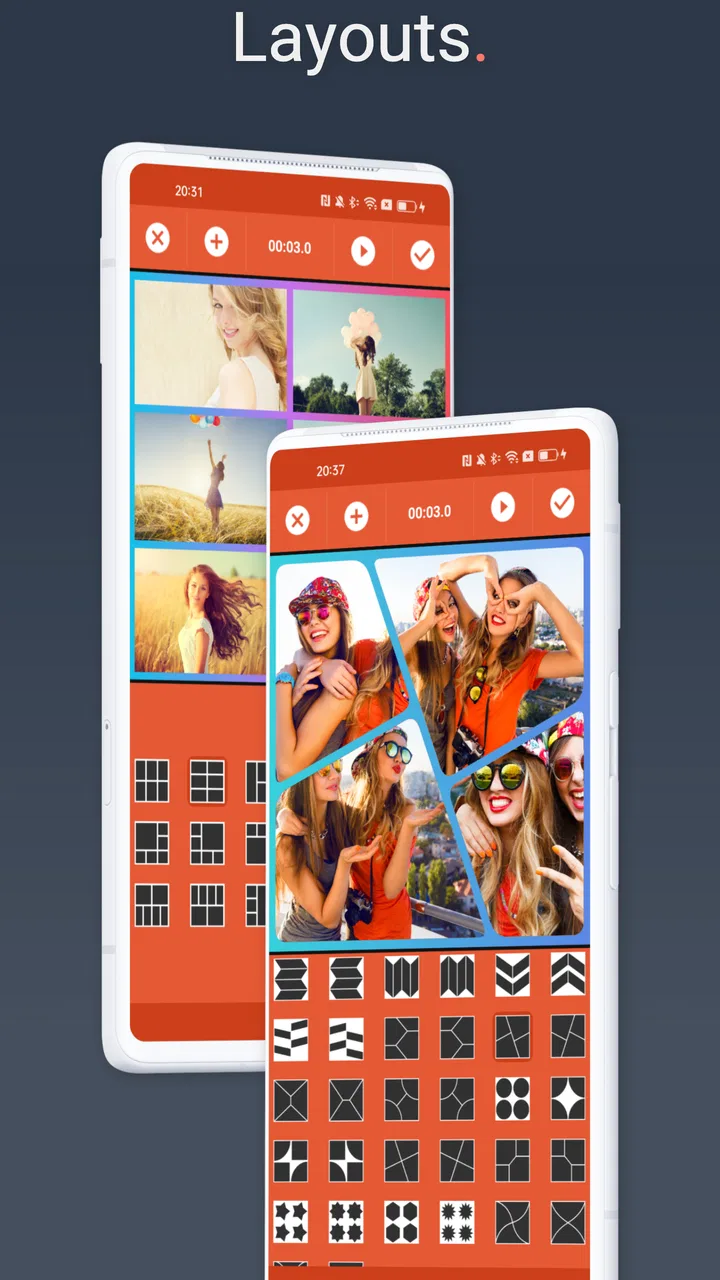
Video Collage Maker: Mix Videos is designed for creating collages that combine multiple video clips, photos, music, text, and decorative elements in one project. After testing its main editing tools, it feels aimed at casual creators who want to prepare content for social networks without using a complex professional editor. It is particularly useful for side-by-side layouts, multi-clip stories, and short montage-style videos.
02Is Video Collage Maker: Mix Videos easy to use for beginners?
Yes, the app is generally approachable for beginners. Its collage templates and straightforward editing controls make it possible to import media, select a layout, trim clips, and adjust the presentation without much prior editing experience. Some options may require a little experimentation, especially when resizing videos, changing borders, or synchronizing music, but the basic workflow is simple enough for quick projects.
03Can I add music, text, filters, and other effects to my video collage?
The app provides the types of creative tools most users expect from a mobile collage editor, including music, text, visual adjustments, borders, and effects. These features help personalize a project beyond simply placing clips in a grid. However, the exact selection and availability of templates or effects may depend on the app version, device, and whether certain tools are included in a free or premium package.
04Does Video Collage Maker: Mix Videos support sharing and exporting finished projects?
Yes, the app is intended to let users save or share completed video collages after editing. Exporting is useful for posting projects to platforms such as Instagram, TikTok, Facebook, or messaging apps. Before starting a long edit, check the available resolution, watermark conditions, and export settings, because free versions of video editors can sometimes limit quality or include branding in the final result.
05Is Video Collage Maker: Mix Videos free to download and use?
The application can generally be downloaded without an upfront purchase, but free access may not include every feature. Depending on the current version, users may encounter advertisements, premium templates, additional effects, or optional in-app purchases. I recommend reviewing the store listing and the permissions requested by the app before downloading, particularly if you plan to use it frequently or export high-quality collages.
Pros
- Combines multiple videos in one frame for creative social posts.
- Supports different collage layouts and adjustable video positioning.
- Useful for creating short highlight reels from several clips.
- Lets you personalize collages with music
- text
- and visual effects.
- Simple editing workflow suitable for beginners and quick projects.
Cons
- Export options may be limited unless premium features are unlocked.
- Complex collages can require considerable storage and processing power.
- Some templates or effects may include branding on free exports.
- Precise trimming and alignment can feel limited for advanced editing.
- Video quality and aspect-ratio choices may vary between layouts.

Video Collage Maker:Mix Videos
Gallery